
It's been a while since I've posted. Here's a video of my 30-minute audio edit session sped up to one minute.
technology
Showing posts with label technology. Show all posts
First LMS Course is Live!

It's taken me approximately 800 years but my first official LMS course is now LIVE! Woo! It's all about using My Workspaces in IHS Engineering Workbench so it's nothing fancy. It has some hotspots where staff need to click in a certain spot to continue through the course but that's about it.
Still, now I know the process of setting up the SCORM stuff, submitting it to our HR department, and using interactivity within videos. In the future, I can incorporate even more elements to make it (hopefully) more engaging.
UNT LISSA Canvas - Pages
Throughout my time as a UNT LISSA Officer, I have been updating the Canvas classroom. I absolutely love organizing files and making information more easily accessible. Now that my time is coming to an end, I wanted to document the various ways I have updated Canvas so that members can easily find needed information.
As I mentioned in my previous entry: UNT LISSA Canvas - Modules, I updated the modules in Canvas so that members could easily find information. As I started rearranging pages into modules, I thought that it would be helpful to create new pages to fill in any gaps. To keep the number of pages to a minimum, I found a template on the Canvas Community board that I used throughout the modules to keep the look consistent. The template "body" is tabbed so that information can be displayed on the same page without adding to the length of the page. It also allows for the "header" and "footer" of the page to stay the same as the tabs are switched for consistency.
As you can see in the gif below, the heading referring students to the UNT Career Center stays the same no matter which tab they click. Similarly, the bottom sentence directs members to the Career Questions discussion board so they can interact with other members to get their feedback.
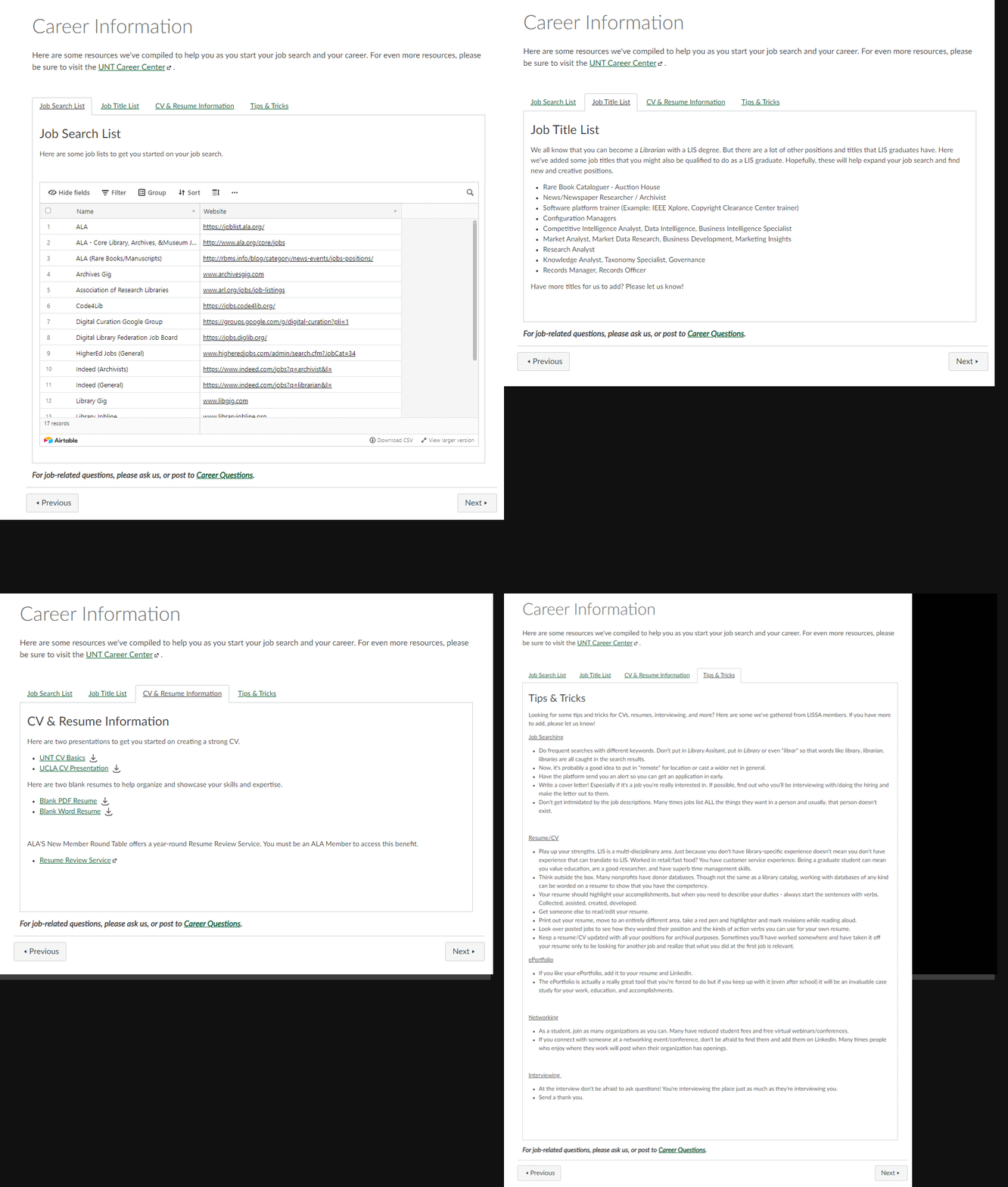
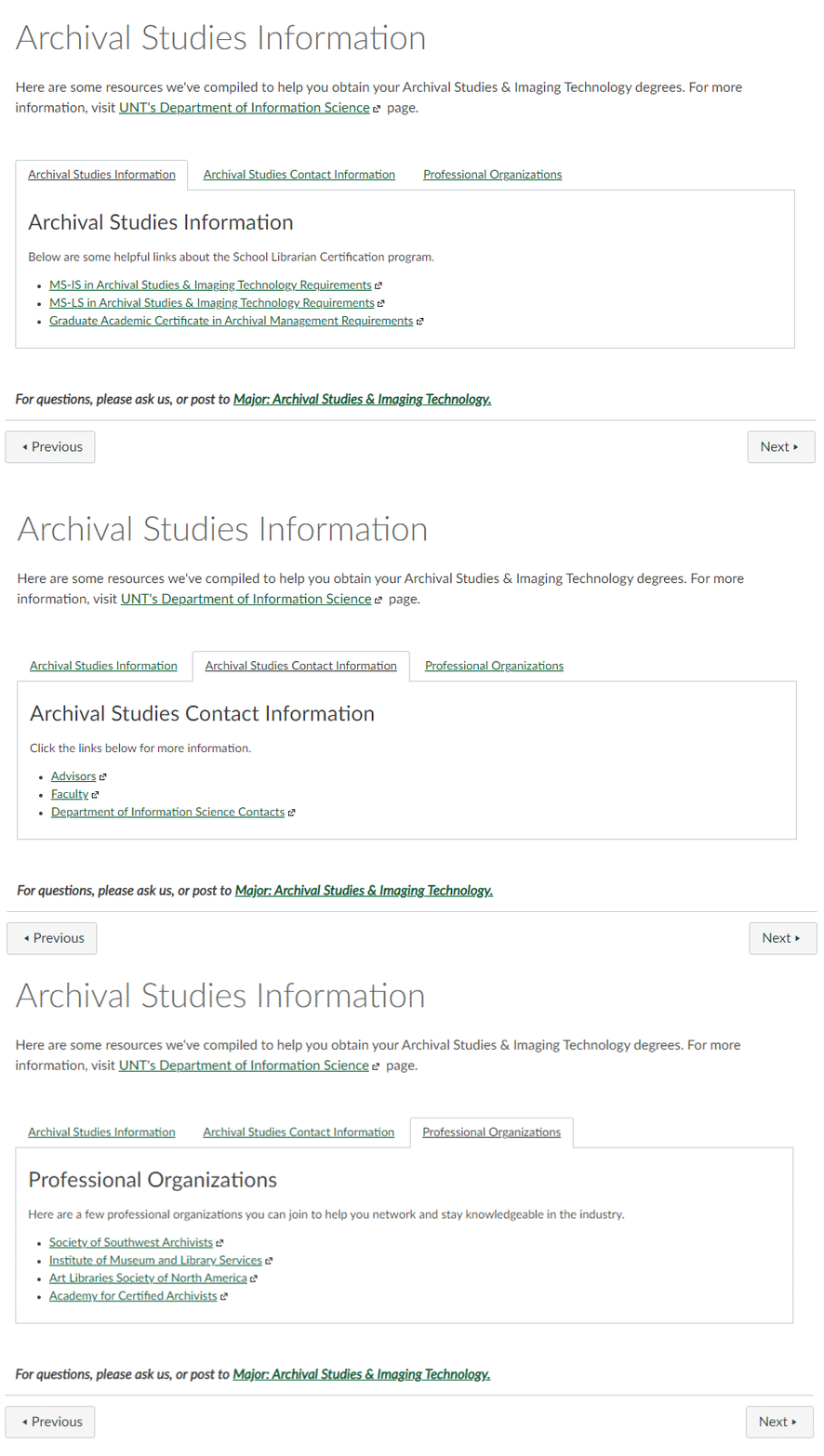
For the Major Modules, the pages stay in the same order and all follow the basic outline of major information, relevant courses, presentations, and discussion board.

For example, the major information page contains information on major requirements, contact information, and professional organizations to join.
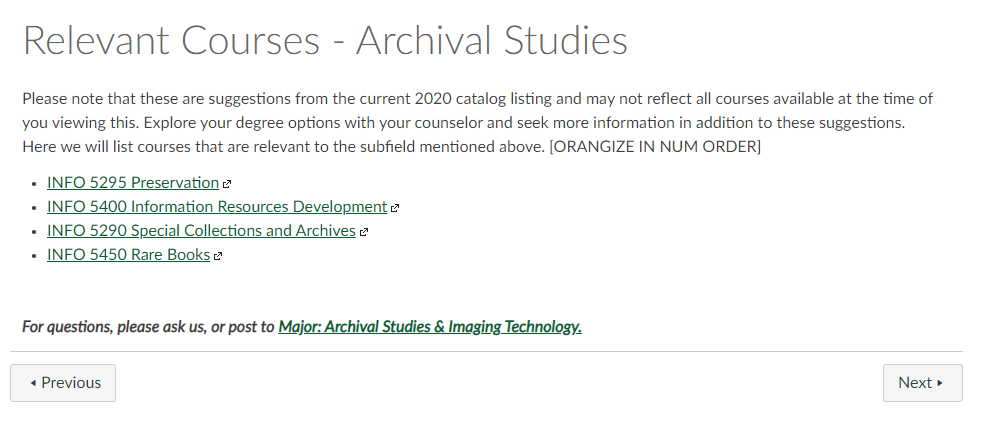
Members who scroll through the module will then see a page listing some relevant courses. This template page was created before I started LISSA but I did hyperlink the courses to their course information page on UNT so students who are interested can see what specific topics of the class.
Perhaps my least favorite layout is the presentations page. I haven't found a good way to organize the Zoom links, recordings, and presentation material. It all feels very cluttered to me. Nonetheless, a page is dedicated to recorded presentations that fit within the major.

Lastly, the corresponding Discussion board for that major is attached to the module.

"...It is the journey that matters, in the end"

“It is good to have an end to journey toward; but it is the journey that matters, in the end."
Ursula K. Le Guin
Last Week of the Practicum Last Week of the Practicum This week was the last week of the UNT practicum. Because I have to write a short reflective essay, I won't add any mushy stuff here. Just wanted to officially document the end of another semester!
Famous Mathematician Virtual Exhibit This week we decided to make the Famous Mathematician exhibit live. Because I created the website, I had to go back and add the Google Analytics tracking codes. Now, we can track visitors to each page. Each hyperlink also received its own tag, so we can also see which tidbit of information people were most interested in. Were they interested in the Galilean moons or in the film, Pi? Did people want to read up on Jerry Tarkanian, or unlike me, do they already know who he was? I'm curious to see how many people view it and what the overall impression is.
We won't announce the audio tour until we get our lobby monitor. But that is more or less ready to go.
On Friday, my boss, my co-worker, and I received an email from the staff newsletter saying that they wanted to run a short story on the virtual exhibit. Awesome! I'm honestly glad that they gave us the questions because I'm a horrible interviewee and pep-talker. My answers in person would have been "Uhh...I don't know, I just did it." They asked what we are most excited about and the opportunities that this now presents.
LMS Training Now that we have a few on-demand tutorials in the bag, my boss wants me to start thinking of providing LMS training. At work, staff can take different online courses through our own LMS system. The system then counts the points or hours of each course to show that we're continuing our professional development.
After watching the Lynda.com course on hotspots in Camtasia, I thought I should try to start an LMS course. Because this will be my first hotspot-making-quiz-adding video and because we'll want to submit this to our LMS system, of which I know nothing about, I figured I would spend this course working on the technical aspects as opposed to the content.
For this first training, I've decided to call it Scopus Basics. Though I will re-record each section, I'm borrowing heavily from the on-demand tutorials already created. Based on the progression of this course, some learning objectives will move around. However, I think by going about this route,
I can work out any technical SCORM-type kinks and then focus on new content for the next installment.
"Certainly I can!"

“Whenever you are asked if you can do a job, tell 'em, 'Certainly I can!'
Then get busy and find out how to do it.”
Theodore Roosevelt
Primo Issues Well, some of the records I edited ended up getting harvested and popping up in Primo search this week. That's a good thing. I'm like 80% sure the problem is something in the 500 field. So I did a batch record modification and deleted the 500 field from all but three records (so that we have a control group). The harvesting happens later in the week so it won't be until next Monday that we know for sure if it is the 500 field.
Our Library During the Pandemic: The View from the UX Office I watched this session of the SLA Texas Annual Meeting this week. It was presented by Rice University's Public Services/Psychology Librarian, Amanda Thomas. They discussed their various library advisory groups which were interesting. Not that they have one, but that they have many! One of the biggest takeaways on the pandemic was the fact that they found it easier and more beneficial to conduct UX testing virtually than in-person. With screen-sharing abilities, real-time observations, and the ability to record, they found that virtual testing was more conducive. This same sentiment was also expressed at work when we had our Quarterly meeting via Webex. Someone mentioned how being able to see the results and the documents were more engaging than previous in-person presentations. watched this session of the SLA Texas Annual Meeting this week. It was presented by Rice University's Public Services/Psychology Librarian, Amanda Thomas. They discussed their various library advisory groups which were really interesting. Not that they have one, but that they have many! One of the biggest takeaways on the pandemic was the fact that they found it easier and more beneficial to conduct UX testing virtually than in-person. With screen-sharing abilities, real-time observations, and the ability to record, they found that virtual testing was more conducive. This same sentiment was also expressed at work when we had our Quarterly meeting via Webex. Someone mentioned how being able to see the results and the documents was more engaging than previous in-person presentations.
OpenAthens Administration Webinar This week I watched a pre-recorded webinar on the OpenAthens Administration side. We are in the process of getting OpenAthens but have not gone live yet. The webinar was an overview of all the backend administration. Because we don't have access to it yet, I wasn't able to follow along with the demo in my browser but it seems pretty easy. There were some instances where I made a mental note to remember that some issues might stem from settings in another section but other than that the layout seems pretty intuitive. I like to be hands-on with my learning so when we get access I'll be looking at this webinar again to familiarize myself with the platform.
Online Together koha-US 2020 Conference

Today is Day 2 of the koha-US virtual conference. I just finished watching the Catalogers, Advance! session and I'm very excited to add and use a macro. I haven't used the Advanced Editor in koha because I'm very intimidated. But I do love me some keyboard shortcuts. Though, I don’t catalog all that often, I think it would be impressive to go into the advanced cataloger and type in things like I know what I’m doing. But since I don’t, know what I’m doing that is, I watched the session. It seems pretty easy and I think the term “advanced” is a bit of a misnomer. I think the more you use it, the more you understand how it works and the faster you get with the keyboard shortcuts.
I also watched a session titled, Very Very Basic jQuery. Though I don’t particularly know what I would need to use jQuery for in koha, the session was helpful because I’ve never used jQuery in my life and the presenter did a very good job of breaking it down.
"Without Work One Finishes Nothing"

"Without work, one finishes nothing."
-Ralph Waldo Emerson
Scopus Certification After six weeks of video tutorials, modules, and quizzes, I have completed my Scopus Certification. Yay! I dabbled in Scopus before the course so that I could create video tutorials, however, the course did help put realistic scenarios into context. For example, I knew that Scopus allowed one to compare sources but being able to concretely say that one can decide where to publish by comparing sources is a more specific example of use. I also liked that Scopus provided one-sheets for various audiences. Though some of the audiences aren’t relevant to SwRI, it still helps to see examples of outcomes that can be tailored to specific users. The course was very helpful overall. I was only slightly disappointed that the API module wasn’t more detailed but I know that they are a beast in their own right. It wouldn’t be fair to expect everyone taking the course to have the background knowledge of APIs to dive deeply into them. The course gave great examples of API use and even highlighted developer tutorials and examples for further research.
LibGuides Analytics SwRI has its own special fiscal calendar with subperiods that I won’t claim to understand but that I liken to broadcast calendars. August 28th was the end of another month which means that this week I ran my LibGuides asset statistics. Each video tutorial I create gets uploaded to LibGuides as an asset along with the transcripts. At the end of each month, I run a report to see which tutorials were viewed the most during the month. This month, the featured video tutorial was How to Save Searches & Set Alerts in Google Scholar so it’s probably no surprise that it had the most views. My Getting Started with ASTM Compass video was approved, so that was also uploaded to LibGuides this week.
1:1 Meeting My boss and I had our 1:1 meeting on Tuesday where we discussed course expectations, project updates, and any other issues or concerns. She mentioned that we will have a meeting later in September to discuss ways to showcase a virtual rare book exhibit. Brainstorming activated.
 Rare Book Database I worked on the database side of the Rare Book Collection this week. I am using Airtable to catalog and showcase the Rare Book Collection. While looking through the gallery, I noticed that the images were not in the correct order. I want users to get as close to a “real” experience as possible so I want the images to display spine, front cover, pages front to back, then the back cover. However, the images were not correctly ordered in the database. I started to manually rearrange the images but quickly decided that there had to be an easier way of automating the task. After some Googling, I saw that unordered uploading was a common problem in Airtable. However, someone had created a script that could be run to automatically sort the image field. On the discussion thread, I noticed that someone mentioned it was bad practice to upload multiple images to one record. They stated that all images should be its own record and should then be linked to the relevant record. At first, I didn’t think this practice relevant to our purposes for the database but upon further reflection, I came to the conclusion that the user had a valid point.
By uploading each image as its own record and then linking it to a relevant record, all records (and the data within them) would be more organized. Also, by uploading each image as its own record - new collections could be created easily without having to reupload the same image. For example, to get the database up and running I want to link all of a book’s images to the Book Title table. But if we ever wanted to create a new collection (such as Scientific Illustrations), all we would need to do is link the image record that is already in the database to a new parent record.
This new system of organization meant that I had ended up deleting a table and creating a new one called Edited Images. The table, Public Book Gallery is now linked to the tables Edited Images and Author Info. By linking in this manner, any changes made to the Author Info table gets automatically updated in the Public Book Gallery. And by having the Edit Images table, at any point in the future, a new table can be created and easily linked to the images for a new gallery.

With one problem solved, I then set about uploading all the images I had previously deleted to the newly created Edited Images table. However, when I started linking them I noticed that I had problems in my original naming convention. I have been naming images Book Title page number or identifier (e.g. Micromagentics p4; Micromagnetics title page). This created problems because the title page usually ends up being the last image when sorted alphabetically. To remedy this, I looked up ways in which I could quickly and easily sequentially rename all files in a folder. I found an easy way to perform the task in Windows. However, the task meant that all images would be renamed to the same title and a sequential number would be added to the end (e.g. Micromagnetics 1; Micromagentics 2). Renaming all of the images in this manner would make uploading to Airtable quick and easy.
However, renaming the images in this way would make it more difficult for staff to find appropriate photos. Though my original naming convention can use some work, staff can search the folder for keywords (e.g. text, figures, plate). I feel that being able to search for features of the images is an important component of the collection. This means that the sequential renaming shortcut would not work in the situation. To solve the problem I have renamed the image with a digit leader (e.g. 01 - Micromagnetics title page; 02 - Micromagentics p4). This naming convention is not the prettiest but will allow the images to be sorted numerically so that they end up showing in the order I want them to.

Thankfully, Airtable allows the primary field to be a formula. With some Googling, I applied a formula to the primary field that keeps the imported image name. Grouped by a feature (such as book title) and then sorted alphabetically, the images can be linked in the appropriate order. And because the original name also contains features of the image, one can search the database with a keyword and will still be able to yield relevant results.
I'm a UNT LISSA Officer

I joined the UNT student organization Library & Information Science Student Association (LISSA) as the Director of Membership & Communication. I was very active in the Canvas "classroom" last semester and loved that they updated students about conferences, organizations, and the virtual happy hours they hosted with LIS professionals.
Though the fall semester hasn't officially started, we had our first meeting a few weeks ago. It was nice to get to "meet" everyone via Zoom and see what goals the organization has for the year ahead.
I absolutely love digital organization so I suggested we move platforms from Google to Airtable. I was having such issues logging into the LISSA Gmail account. With Airtable we have everything we need in one place and I don't have to worry about signing into and out of various accounts. I probably sound like a spokesperson for the service but Airtable is one of the best services I've found...probably ever. It's so customizable. I've used it for so many different processes for work, school, and home.
So we're in the process of moving everything over. I've already started a Membership Directory that will be updated once the fall semester starts. I also created a survey so that members and potential members can submit their degree information, areas of interest, and comments. With the survey, we'll be able to see what kind of topics students are interested in and we'll be able to connect students with other members of the same degree.
Hopefully my work on the Airtable will make processes go smoother in the semesters to come.
35th Annual NASIG Conference

I was so appreciative that NASIG was able, with its sponsors, to offer a free virtual conference for students. I would not have been able to attend the conference otherwise and therefore wouldn't have been able to see first-hand what NASIG is all about. Prior to the conference, I wasn't familiar with NASIG but the conference presentations really gave a feel for what issues and subjects NASIG focuses on.
As I watched the webinars, I took some notes which I've pasted below.
Mapping Domain Knowledge for Leading and Managing Change
"Just because you said you're a leader, doesn't mean that you were giving the leadership that was needed."
This quote really resonated with me. It's so true. I've worked for, or worked with, people who see themselves as leaders but who were in fact...not. Calling yourself a leader does not automatically make you a good one, a nice one, an efficient one. Leading is hard and many people are not born leaders. The information provided in this presentation was very helpful.
Practical Approaches to Linked Data
This is interesting. I don't even know what linked data is specifically but it is definitely something that I want to look into further. Wikidata? Wikimedia? Further study is needed on this.
Access to Supplemental Journal Article Materials
This is something that I've never really thought of before. I never really needed SJAMs when working in undergrad and never realized how difficult they might be to access. If researchers build off of other research(ers), then why isn't there a universal way to send/receive all the pertinent information?
COUNTER 5: Lessons Learned and New Insights Achieved
Interning at SwRI was the first time I'd ever heard of COUNTER. I think the concept is really interesting for insights into what kind of content patrons are using. I like that they are all standardized and that they can be downloaded and pulled without much hassle across various platforms.
Knowledge Bases: The Heart of Resource Management
A very thorough and easy-to-understand explanation of what a knowledge base is and how important they are to the library. I haven't come across the term in school yet but will now have a sense of what the term means if I ever do.
Transforming Library Collections and Support Student Learning with Collection Mapping
I loved this presentation. This is something that I would absolutely love to do. The fact that you have to set these goals but you're also utilizing data from many different areas to figure out what your goals should be is amazing. As someone currently going through graduate school and as I am unsure of what type of position I want in the future, this presentation brought me joy. I love that it's interdepartmental and that faculty were consulted with regards to weeding and purchasing. I love that whole degree plans and single elective classes were taken into consideration for what should be kept, weeded, added to.
Traditional versus Modern Skills for Information Professionals

What are emerging skills are needed by modern information professionals? How is this different from traditional notions of the profession?
Because libraries of today look different than the libraries of the past, it makes sense that the skills needed would be tailored differently as well. In the past, finding information meant that a librarian would look through physical documents, today many librarians still assist users in their information search albeit with a computer rather than a card catalog. In the past, librarians espoused reading literacy, today information literacy is an important aspect of teaching a new generation. One of the biggest changes from traditional libraries is the creation of Makerspaces and Learning Labs within modern libraries.
Technology has advanced rapidly and with the innovation can come gaps in knowledge for those who are unable to access all that is offered. Learning Labs offer patrons places to learn technology, interact with media, create projects, and engage with the community (Koh & Abbas, 2015). In positions such as these, it is important to have a variety of skills that include both hard and soft skills. When it comes to soft skills, Pradhan (2015, p. 110) found that communication skills were the most sought after skill in India. Lopatovska and Baribeau (2017) found that over the eight semesters of analysis “communication” was one term that yielded the highest results (p. 748), corroborating Pradhan’s findings in the United States.
With both Learning Labs and Makerspaces, it is important to have knowledge of technology, equipment, and software. Koh and Abbas (2015) described this best as the ability to learn (p. 119). The term encompasses more than just the knowledge one has but includes the ability to learn more than a list of duties and helps describe one’s drive to educate themselves on new and emerging technologies.
In Pradhan’s (2015) research, interpersonal skills were mentioned in 80% of the jobs. These skills such as teamwork, leadership, and problem-solving have always been important parts of the library science professions. However, the way professionals now enact these skills are different. Teamwork now includes working with IT, multiple departments, and diverse populations. Problem-solving now includes fixing the printer, finding the broken code on a sample coding program and assisting patrons with their research project.
Another way in which modern librarians have had to reassess their traditional strategies comes to their moral responsibilities. As Lor and Britz (2011, p. 12) explain, the use of technology has made librarians shift their moral responsibilities from a retrospective model to a more positive perspective model that includes “anticipating possible harmful impacts of modern ICTs” (information and communication technologies). Again, librarians have had to think of moral responsibilities in the past, but now, the way in which they approach their moral responsibilities has shifted with the unpredictability of technology.
As technology and the idea of what libraries can offer to the community continue to change, so too will the way in which librarians interact with the public and will, therefore, have an impact on the skills that are needed to do their job properly and assist their community.
References
Koh, K., & Abbas, J. (2015). Competencies for information professionals in Learning Labs and Makerspaces. Journal of Education for Library and Information Sciences, 56(2).
Lor, P. & Britz, J. J. (2011). New trends in content creation: Changing responsibilities for librarians. Libri: International Journal of Libraries & Information Services, 61(1), 12-22. doi:10.1515/libr.2011.002.
Lopatovska, I., & Baribeau, H. (2017). What information professionals need to know: Job ads analysis. Proceedings of the Association for Information Science and Technology, 54(1), 747-749.
Pradhan, S. (2015). Study of employability and needed skills for LIS graduates. Journal of Library & Information Technology, 35(2), 106–112. doi: 10.14429/djlit.35.2.8312
Subscribe to:
Posts (Atom)